 TurningTrade
What market by order is
On CME, the Market by Order Full Depth feed disseminates every order and quote at every price level, with no maximum number of orders or levels. Each order carries an ID and a priority that places it against the other orders on the same side and price. Market participant anonymity is preserved1.
Databento, which sells this data, puts it this way: MBO gives every order event on the book, often called L3 data. It shows each order’s position in the queue, and every modification: cancellation, change in size or price2. Rithmic describes its MBO feed as the one that shows individual orders, not just aggregated volume at a price3.
MBO vs MBP, the difference
Market by price aggregates. At each level it gives the total quantity and the order count; the number of levels sent is set instrument by instrument4. Databento sells it at two depths: the top price level (MBP-1) or the top ten levels (MBP-10)5.
| What you see | MBP (market by price) | MBO (market by order) |
|---|---|---|
| Unit | The price level4 | The order, with its ID1 |
| At a given price | Total quantity and order count4 | Each order, its quantity and its priority1 |
| Depth | Number of levels set per instrument; top level or ten levels at Databento45 | No maximum number of orders or levels (CME, full depth)1 |
| Queue position | One total per level, no individual orders4 | Yes: how many orders are ahead at that price2 |
| Pulled or filled | The level’s quantity changes4 | Each cancellation, size or price change, order by order2 |
CME Group: MDP 3.0 technical wiki. Databento: microstructure guide. The numbers point to the sources at the bottom of the page.
What MBO changes on a heatmap
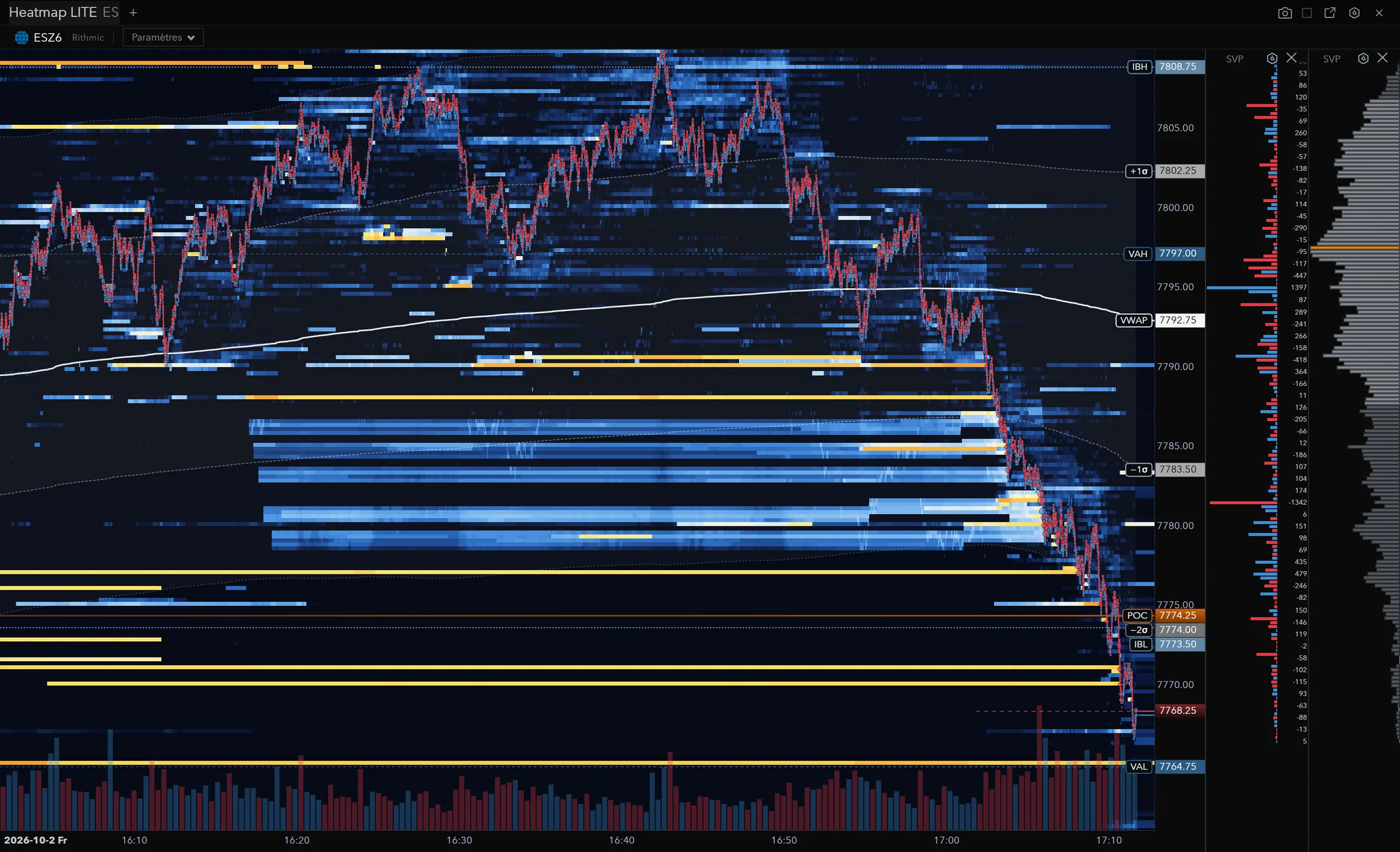
A heatmap draws the book over time: each liquidity level becomes a line that lasts as long as the orders stay. With MBP, when a line goes dark just before price gets there, all you know is that the quantity dropped. With MBO, each order has its own event: you can tell a level eaten by trades from a level pulled by cancellations, and a level that refills from one that holds.
In TurningTrade, the heatmap reads the Rithmic feed at the order level. It’s part of the licence, with the footprint, the DOM with Time & Sales Pro and the Market Profile, on 166 futures instruments depending on your account’s permissions. The connection itself is covered on our Rithmic trading platform page.
What MBO changes for detectors
A detector that reads the book order by order can count what a total hides: cancellations, refills, how fast a level empties. On TurningTrade’s heatmap, two detectors are shipped, Stop-run and Sweep. They’re off by default, and they were measured against chance on real MBO data. The Iceberg, Absorption, Exhaustion and Breakout detectors are announced, not shipped.
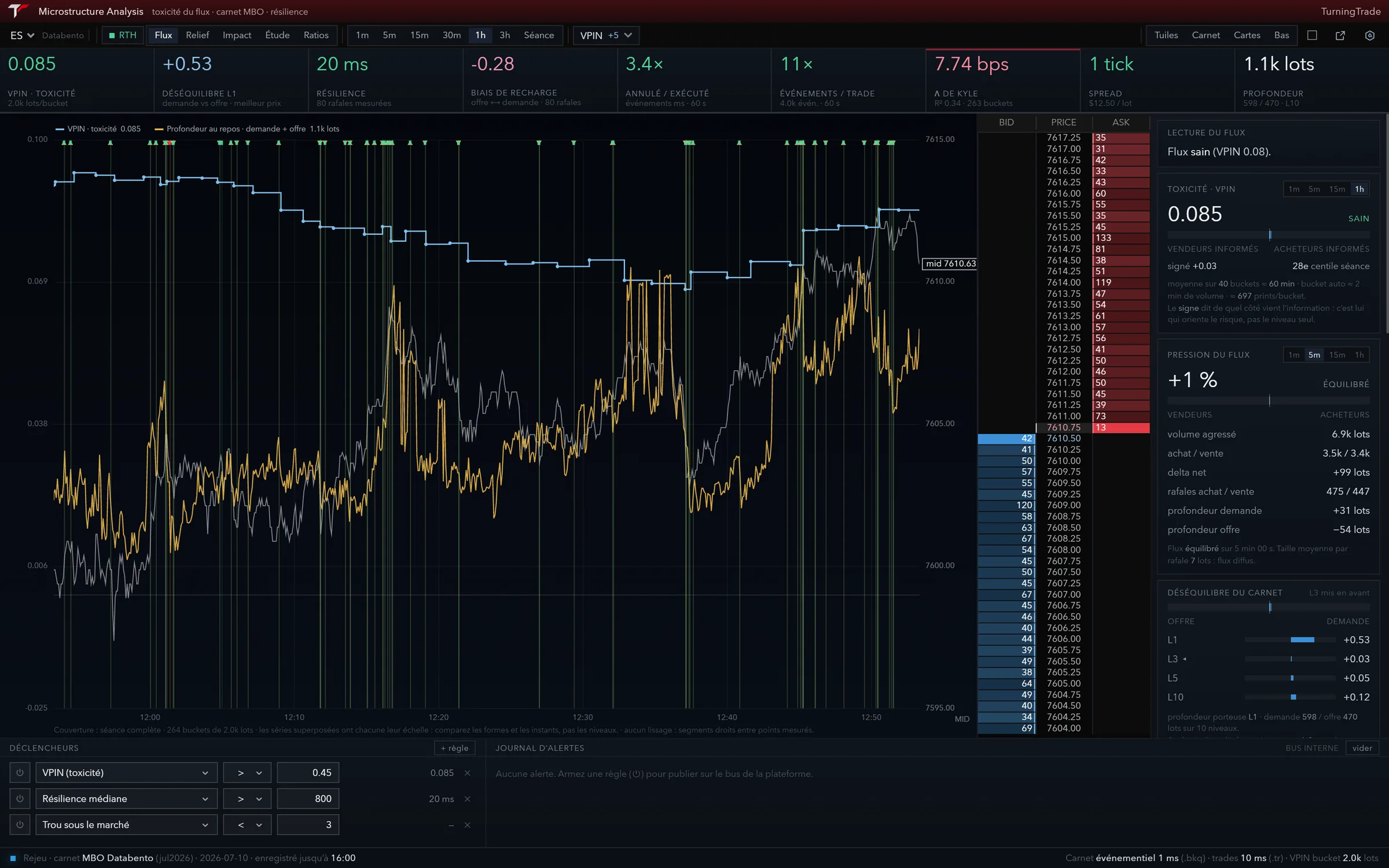
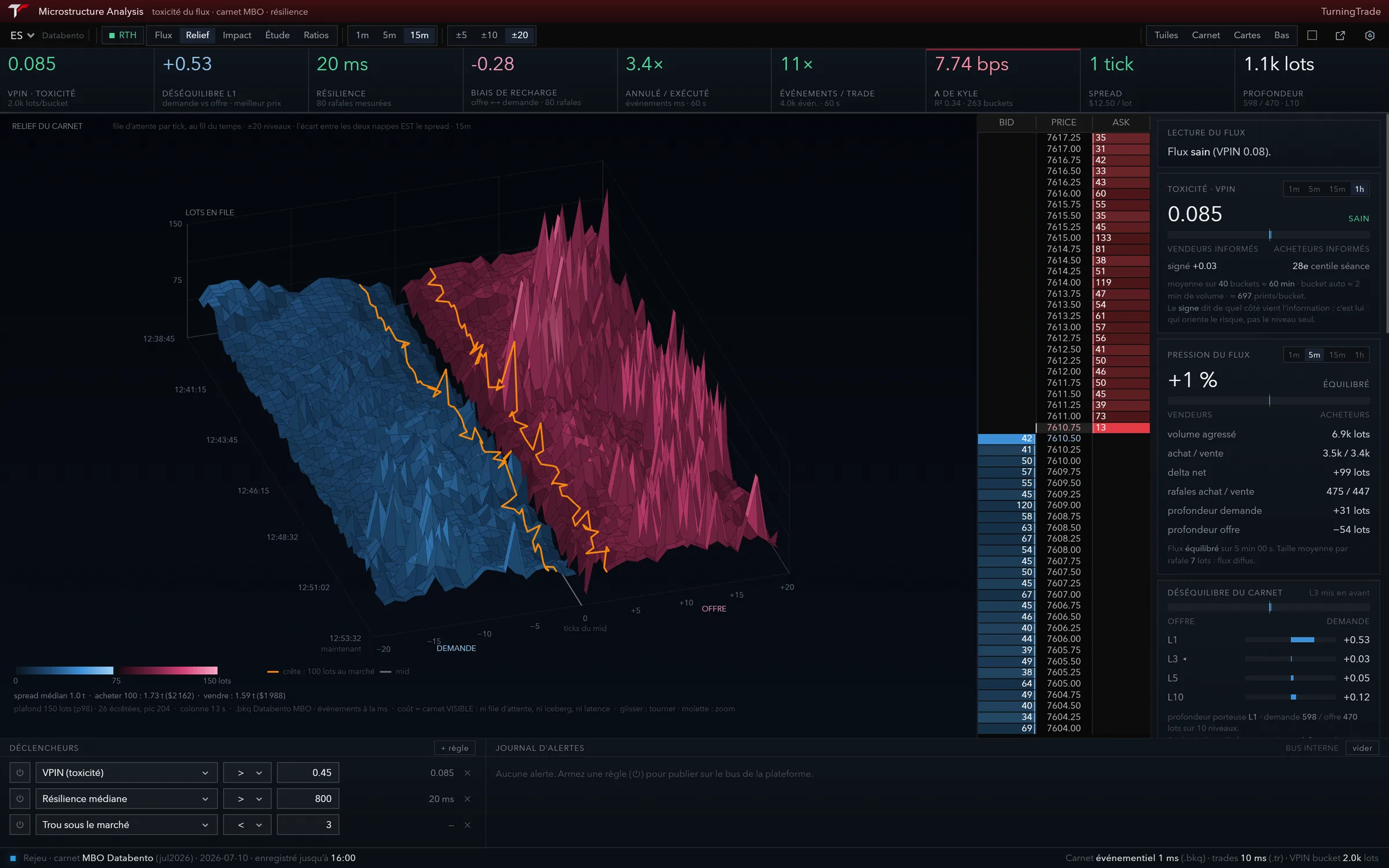
Microstructure Analysis measures flow quality from the same book: toxicity (VPIN), book imbalance, resilience, and a 3D relief of the queue. In the capture below, the ratio of cancelled to executed orders reads 3.4 over the last 60 seconds: a number that takes following every order.
ALFRED, the AI assistant, reads the book up to twenty levels and answers with those numbers. The detectors and the feed are covered in detail in the Help Center. What the AI does with those numbers, and where it stops, is in our AI trading platform guide.
Where to read MBO on CME futures
You need two things: a feed that carries MBO, and a platform that reads it. Order flow platforms sell it in different ways; the grid below reflects what each one publishes.
| Platform | Where MBO sits | Feed |
|---|---|---|
| Bookmap | MBO Bundle (Stops & Icebergs, Liquidity Tracker Pro, Tradermap Pro, Market Pulse), with Global or Global Plus6 | BookmapData CME or Rithmic6 |
| ATAS | MBO Bundle (Iceberg, Stop Runs, Sweeps) with the Ultra plan, free until November 27, 20267 | Rithmic; dxFeed in development7 |
| Sierra Chart | Service Package 12, $56 a month (less when paid for several months)8 | Sierra Chart’s delayed feed with MBO; external feeds with an Integrated package8 |
| TurningTrade | Heatmap in the licence, Stop-run and Sweep detectors; Microstructure Analysis | Native Rithmic, at the order level |
In every case, the account and market data are paid separately, to your broker or prop firm. The rest of each offer is compared line by line on our Bookmap alternative and ATAS alternative pages.
On the account side, check the depth you receive. At Tradeify, for example, every account gets Level 1 CME data, and Level 2 isn’t available yet on Rithmic9. Without depth, a heatmap has nothing to draw, MBO or not.
Frequently asked questions
What is market by order?
A feed that sends every order in the book, with its ID, quantity and queue priority, instead of one total per price level. On CME, the full depth version has no maximum number of levels1. It’s also called L3 data2.
What is the difference between MBO and MBP?
MBP gives, at each level, the total quantity and the order count4. MBO gives each order, its place in the queue and each of its modifications2.
Does MBO show who placed the order?
No. On CME, the MBO feed preserves market participant anonymity1. You see the order, not its owner.
Does TurningTrade read MBO?
Yes, through Rithmic. The heatmap reads the feed at the order level and is part of the licence, with the Stop-run and Sweep detectors, off by default. Your Rithmic account and data permissions stay separate.
Do the detectors guarantee a profit?
No. They add order-level context. No indicator removes uncertainty, and futures trading can result in the loss of the capital committed.
See the lifetime licence
One-time payment of 1,499 USD (1,349 EUR in the euro area): MBO heatmap, footprint, DOM, Market Profile, Microstructure Analysis, ALFRED, every later version, the 10-module order flow training and priority support. Your Rithmic account and data fees stay separate.
See pricingSources
- CME Group Client Systems Wiki, MDP 3.0 - Market by Order - Book Management, read on October 18, 2026. Page modifiée le 23 décembre 2024.
- Databento Microstructure Guide, What is market by order (MBO) data?, read on October 18, 2026.
- Rithmic, Technology (MBO data), read on October 18, 2026.
- CME Group Client Systems Wiki, MDP 3.0 - Market by Price - Multiple Depth Book, read on October 18, 2026. Page modifiée le 26 décembre 2024.
- Databento Microstructure Guide, What is market-by-price (MBP) data?, read on October 18, 2026.
- Bookmap Blog, MBO Bundle (article du 3 juin 2025), read on October 18, 2026.
- ATAS, Pricing, read on October 18, 2026.
- Sierra Chart, Service Packages, read on October 18, 2026.
- Tradeify Help Center, Supported Platforms, read on October 18, 2026. Page marquée « Updated yesterday », sans date exacte.
TurningTrade facts: release notes, pricing and FAQ published on turningtrade.com (see the Pricing page and the Help Center).