 TurningTrade
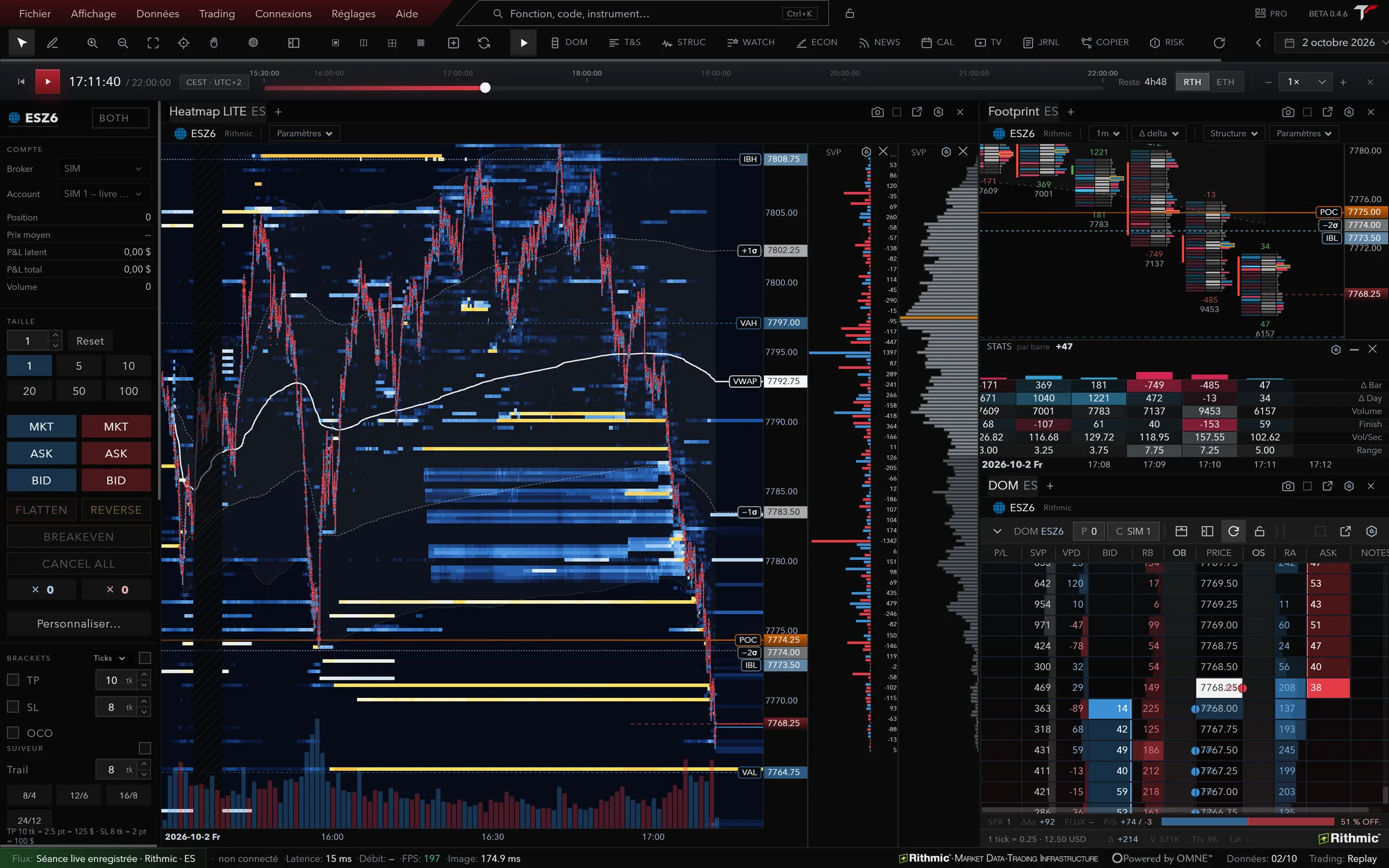
What runs on a Mac today
You download the Mac version from your licence area, with the same licence as on Windows. On first launch, macOS asks for your permission once, and the licence area shows the exact steps. Intel Macs aren’t supported.
On the market side it’s the same platform: a native Rithmic feed at the order level, 166 futures instruments on CME, CBOT, Eurex, NYMEX, COMEX and CFE depending on your account’s permissions, and orders routed through Rithmic only. Binance and Hyperliquid crypto perpetuals can be read; no order is routed there.
What lags behind on a Mac
The Mac ships on its own schedule. Today Windows is on 0.4.9 and the Mac on 0.4.2: features released in between aren’t on the Mac yet. Every update ships with release notes. If one feature matters to you, check that it exists in the Mac version before you buy, or ask support.
If you also have a PC, the licence covers one active machine at a time: install TurningTrade on the other computer, activate it with the same key, and the old one signs out on its own. On Linux there’s a 0.4.6 preview as a .deb or an AppImage (Ubuntu 24.04 or later, Debian 13), unsigned and without automatic updates.
Other futures platforms on a Mac
Here is what the platforms futures traders compare most often publish about the Mac, from their own pages, read on October 18, 2026. The table doesn’t rank anyone: it only says what runs on a Mac, and how. To weigh them on the other criteria too (data feed, order flow, cost, prop firm), read our guide to choosing a futures trading platform.
| Platform | On a Mac | Worth knowing |
|---|---|---|
| Bookmap | Mac app in two builds, Intel and Apple silicon, macOS 10.12 or later1 | GPU acceleration on Apple silicon from macOS 13. Linux support is limited.1 |
| NinjaTrader | No Mac desktop app: NinjaTrader Desktop requires Windows 11 or Windows Server 2016 or later, 64-bit2 | NinjaTrader Web opens in a PC or Mac browser.3 |
| Tradovate | Desktop app for Mac and Windows, plus browser, iPhone and Android4 | Plans also include access to NinjaTrader Desktop, Web and Mobile.5 |
| Sierra Chart | No native Mac version: designed for Windows, used on a Mac through Crossover or Wine6 | A 64-bit ARM build exists for ARM processors. Linux is planned, not supported yet.6 |
| ATAS | Classic version built for Windows, run on a Mac through Parallels Desktop or another virtualisation tool7 | ATAS X, in beta, runs on macOS Tahoe or later with Apple silicon, and isn’t a full replica of the classic version.8 |
| Quantower | Download for Windows 10/11 64-bit9 | The download page mentions neither macOS nor Linux.9 |
| TurningTrade | Native Apple silicon app (M1 and later), macOS 11 or later, version 0.4.2 | Newer Windows version (0.4.9). Intel Macs not supported. |
Numbers point to the sources at the bottom of the page. A platform run through virtualisation often works, but its publisher doesn’t design it for the Mac.
Parallels or native: what it changes during the session
With Parallels, Windows runs inside macOS. Both systems share the memory, and the Rithmic connection goes through the virtual machine’s network card. For 5-minute candles, that holds. At the 9:30 New York open, when the heatmap redraws the book on every MBO update and the DOM is scrolling, shared memory and CPU become the issue.
For TurningTrade, the measured floor is 4 cores, 16 GB of memory and an SSD; the Help Center publishes the full table and the machine every figure was measured on. Running natively, those resources go to the platform, with no Windows running alongside.
One detail that costs people a morning: two applications connected to the same Rithmic feed at the same time disconnect the first one10. If you keep a virtual machine running with another platform connected, close it before you connect, or the other way round. The Rithmic side is covered on our Rithmic trading platform page.
What you read on screen
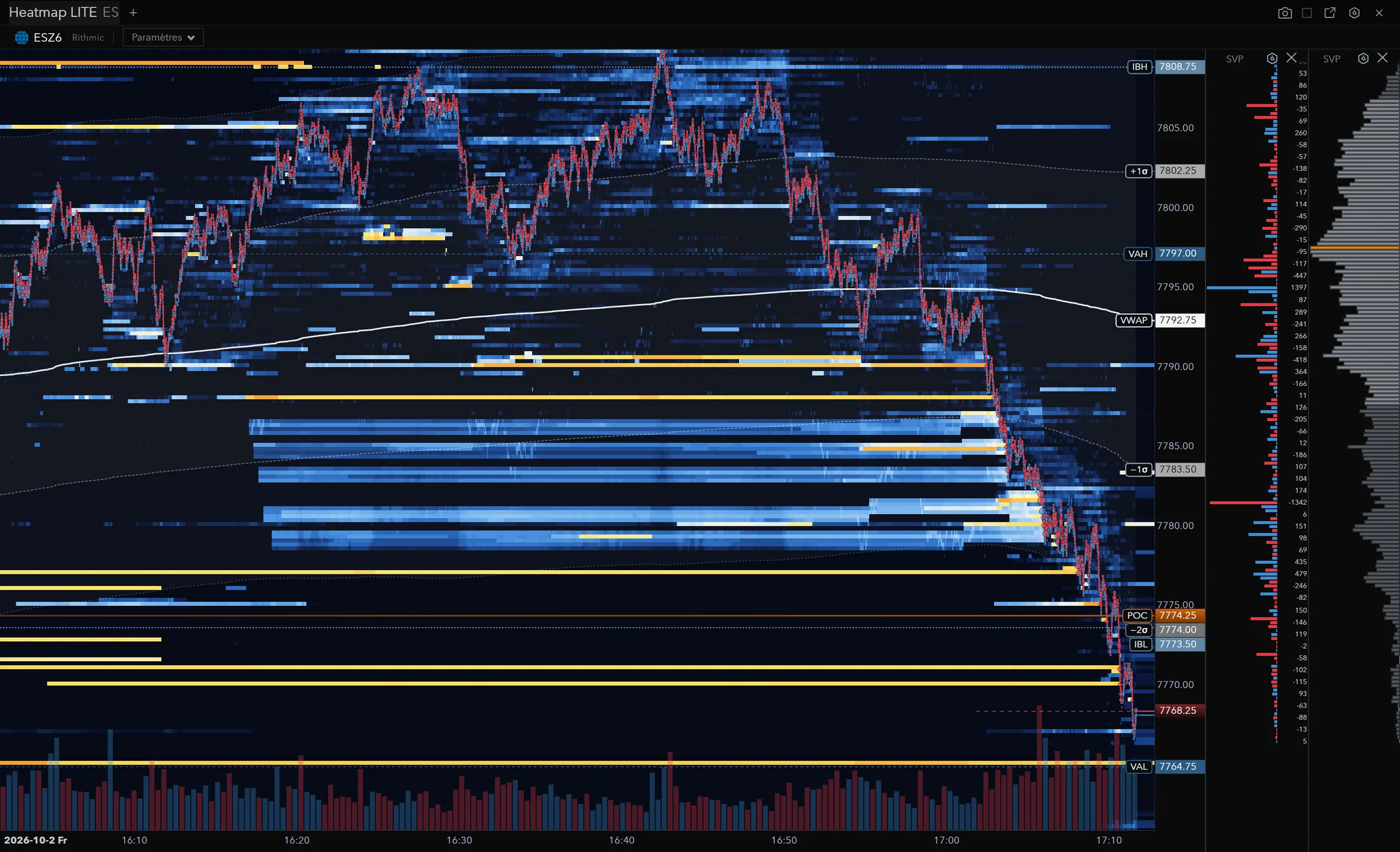
The heatmap shows book liquidity at the order level: the walls that hold, and the ones pulled just before price gets there. Two detectors ship on it, Stop-run and Sweep, off by default; they add context and guarantee nothing.
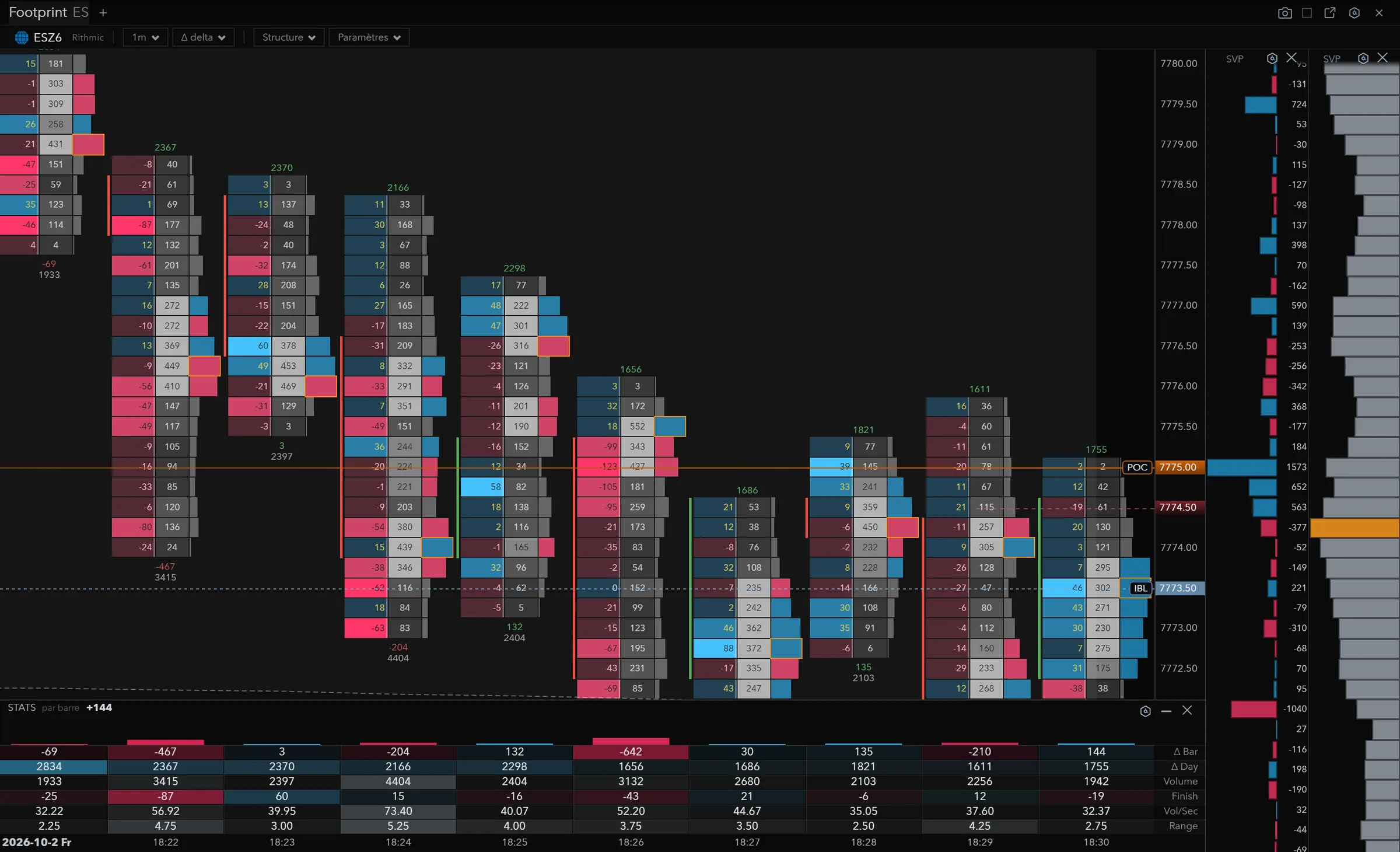
The footprint splits each bar into volume bought and sold at each price (bid × ask), with large trades and the bar’s Δ max / Δ min. You see where market sellers hit the bid without pushing price one more tick lower.
ALFRED, the platform’s AI assistant, reads what your modules display and answers with those numbers. Circle a zone with the AI Brush and he returns the zone’s volume by price, POC, value area, buy and sell delta, high, low and VWAP. Live order sending is the only one of his rights that’s off at install. Details on the ALFRED page. What AI does during a session, and what it leaves to you, is in our AI trading platform guide.
Frequently asked questions
Does TurningTrade run on an Intel Mac?
No. The Mac version targets Apple silicon Macs (M1 and later) on macOS 11 or later.
Do I need a separate licence for the Mac?
No. The same licence works on Windows, Mac and Linux, for one active machine at a time: activate the new machine with your key and the old one signs out.
Does the Mac version have the same features as Windows?
Not all of them. The published Mac version is 0.4.2 and the Windows version is 0.4.9: what shipped in between isn’t on the Mac yet. Check the feature that matters to you before you buy.
Is Rithmic included in the price?
No. The lifetime licence costs 1,499 USD (1,349 EUR in the euro area). Your Rithmic account, exchange permissions and data fees stay separate.
Can I trade a prop firm account from a Mac?
Yes, through your Rithmic connection. Firms recognised on Rithmic: Apex Trader Funding, Topstep, My Funded Futures, Tradeify, Phidias, Bulenox, Earn2Trade, TradeDay, Lucid Trading and Take Profit Trader. TurningTrade isn’t affiliated with any of these brands.
One lifetime licence, Mac included
One-time payment of 1,499 USD (1,349 EUR in the euro area): the platform on Windows, Mac and Linux, every later version, the 10-module order flow training and priority support. Your Rithmic account and data fees stay separate.
See pricingSources
- Bookmap Knowledge Base, System Requirements, read on October 18, 2026.
- NinjaTrader 8 Help Guide, Minimum System Requirements, read on October 18, 2026.
- NinjaTrader, Pricing, read on October 18, 2026. ninjatrader.com renvoie les visiteurs de France vers une page européenne : formules lues par l’index du moteur de recherche, et identiques à celles de tradovate.com/pricing, lue directement.
- Tradovate, Devices, read on October 18, 2026.
- Tradovate, Pricing, read on October 18, 2026.
- Sierra Chart, Software Download, read on October 18, 2026.
- ATAS Help Center, How to use ATAS on Mac, read on October 18, 2026.
- ATAS X (Beta), read on October 18, 2026.
- Quantower, Download, read on October 18, 2026.
- Rithmic, Connection Guides (« Running multiple platforms simultaneously »), read on October 18, 2026.
TurningTrade facts: release notes, pricing and FAQ published on turningtrade.com (see the Pricing page and the Help Center).