 TurningTrade
What a trading terminal is
For a futures trader, the word means a trading platform you install, as opposed to one you open in a browser. It receives a real-time market feed, draws the book and the trades, and sends orders to your account at your broker or prop firm. The broker holds the account; the terminal is the tool you read and execute with.
In crypto, “terminal” also names web interfaces for swapping tokens or betting on prediction markets: that’s not what this page is about.
Installed or in the browser
Many vendors offer both. A web platform opens anywhere, with nothing to install, and works for watching a position or placing a simple order. An installed application owns the screen: several windows, several monitors, rendering that keeps up with the book, and heavy modules like a footprint or a heatmap. The grid below reflects what each vendor publishes.
| Platform | Installed application | Browser and mobile |
|---|---|---|
| NinjaTrader | NinjaTrader Desktop: Windows 11 or Windows Server 2016 and later, 64-bit1 | NinjaTrader Web, from any PC or Mac browser2 |
| Tradovate | Desktop apps for Mac and Windows3 | Browser, Android and iPhone3 |
| Sierra Chart | Designed for Windows, 64-bit only; Mac and Linux through Crossover or Wine4 | No browser access presented on the download page4 |
| ATAS | Built for Windows, Mac through Parallels; ATAS X in beta for Windows and macOS Tahoe or later, Apple M1 or newer56 | No browser access presented on the pages read56 |
| Bookmap | Windows, Mac (Intel and Apple silicon), Linux with limited support7 | No web version on the system requirements page7 |
| Quantower | Windows8 | No browser access presented on the home page8 |
| TurningTrade | Windows 10/11 (0.5.0), Apple silicon Mac (0.4.2), Linux preview (0.4.6) | None: the mobile companion app is announced, not shipped |
The numbers point to the sources at the bottom of the page. On a small screen, scroll the table sideways.
What a futures trading terminal has to handle
A real-time feed, and its depth
The terminal shows what the feed sends. A price-level feed aggregates the book; an order-level feed (MBO) shows each order, so you can see a wall get pulled before price reaches it. Our MBO data guide explains the difference.
The book and the tape
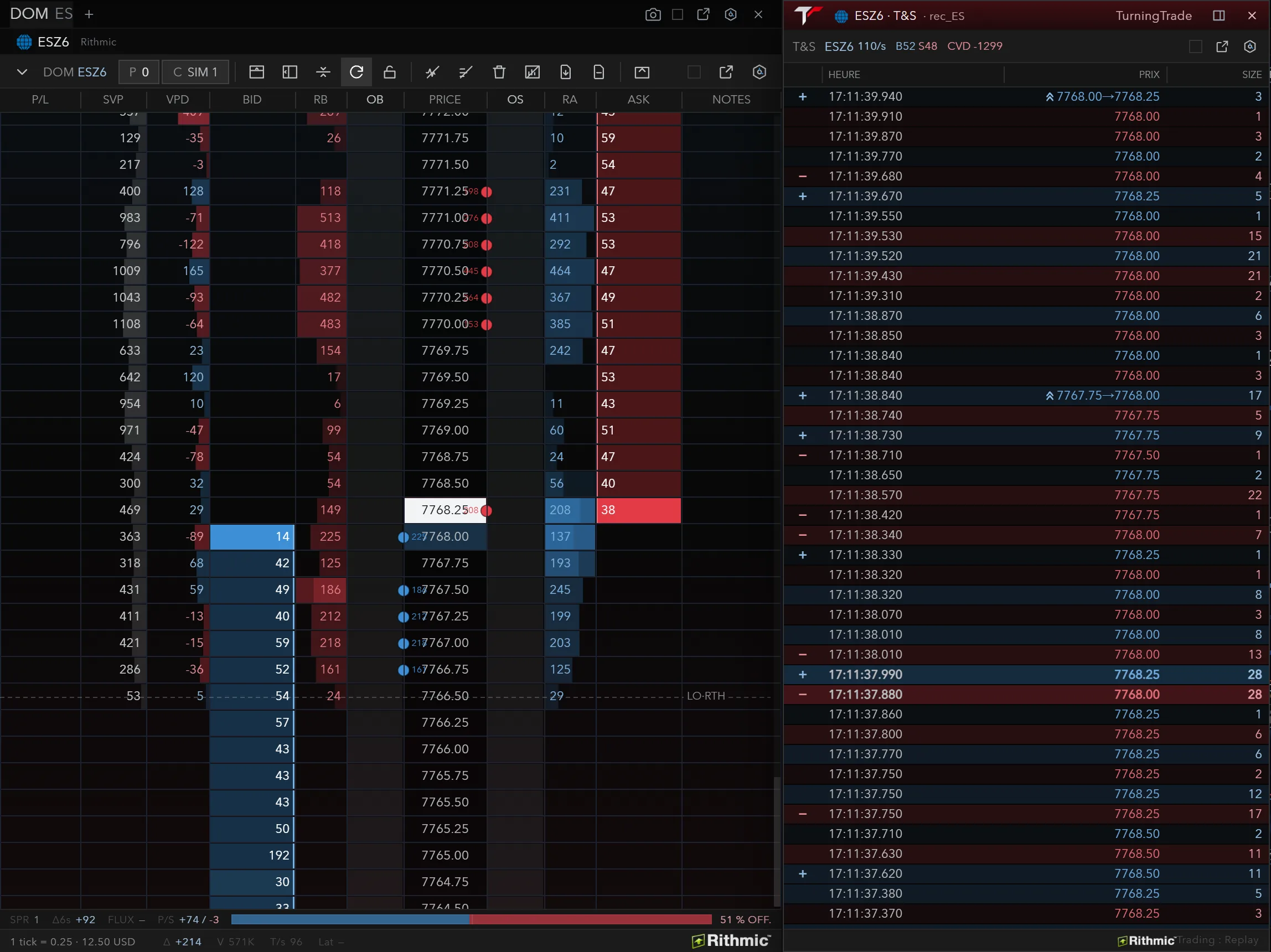
A DOM that shows the queue at each price, and a Time & Sales that follows every trade. In the screenshot below, Time & Sales timestamps trades to the millisecond: at 17:11:37.880, 28 contracts sold at the bid at 7,768.00, then, 110 milliseconds later, 28 bought at the offer at 7,768.25.
Execution and risk
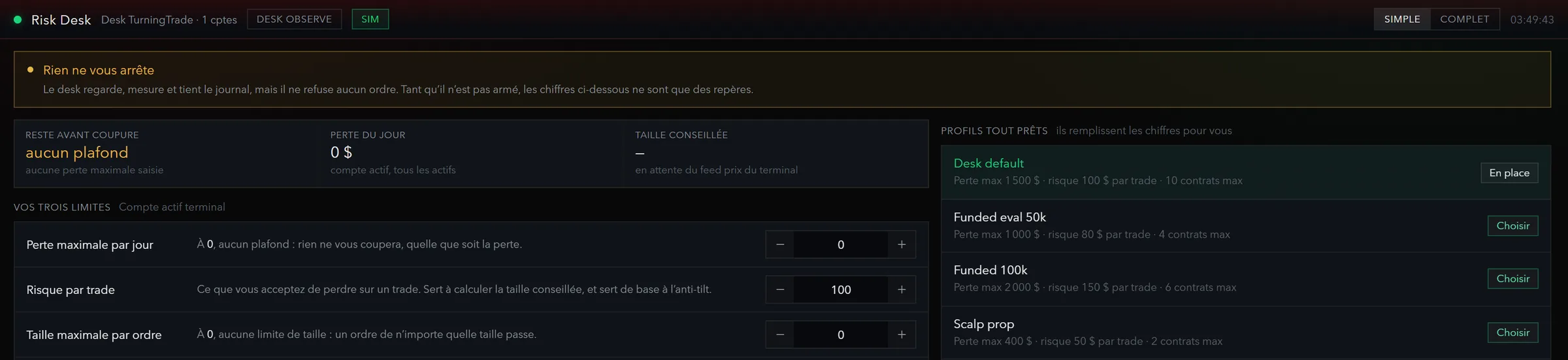
Placing the order where you read the market: a click in the DOM, a preset size, a bracket attached at entry. And a guardrail that cuts before one loss too many. In TurningTrade, a stop on the wrong side of price, a stop with no trigger or an order without a type is rejected before it’s sent, and the Risk Desk holds the limits, the anti-tilt pause and the kill switch.
TurningTrade Terminal, a concrete example
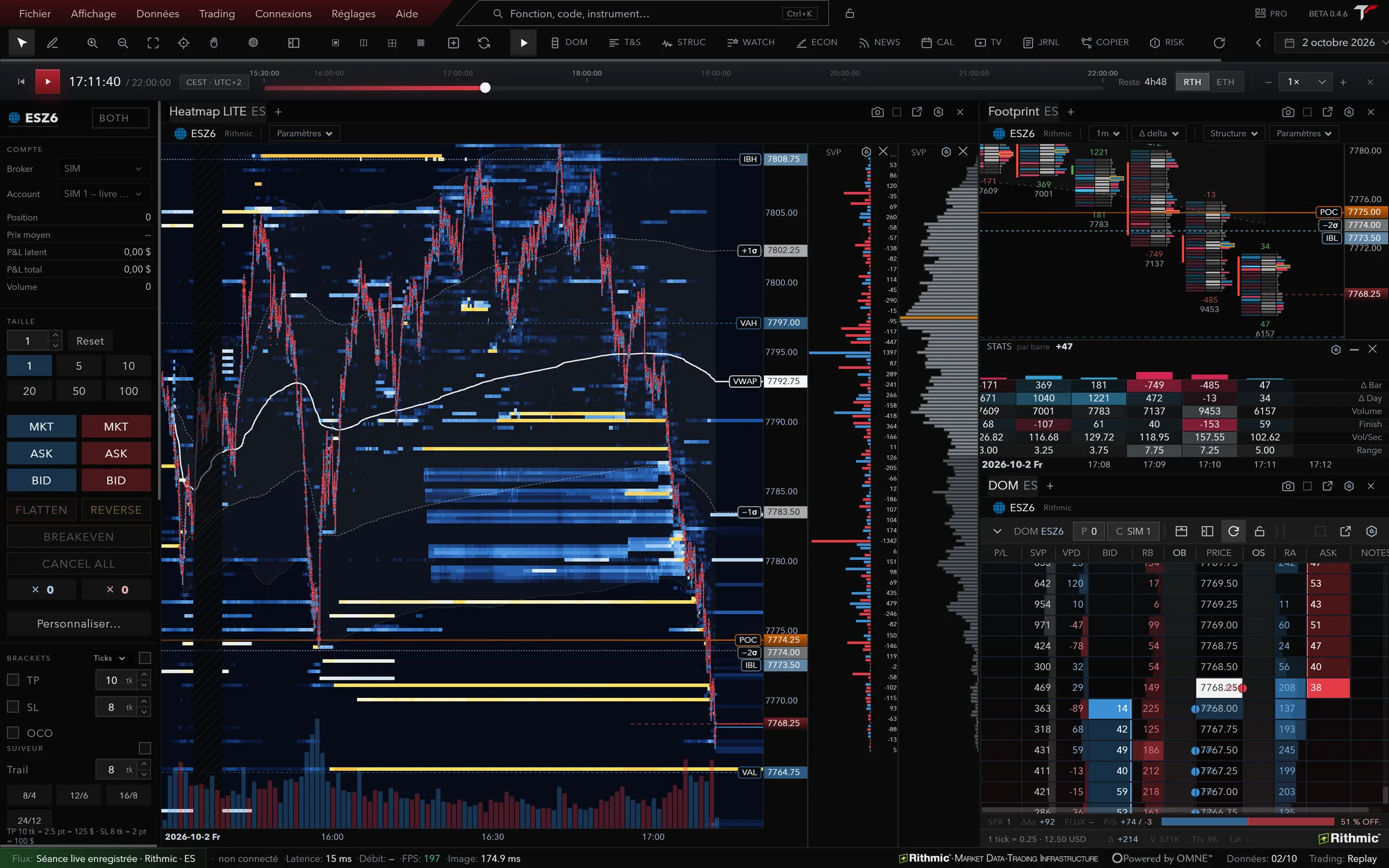
TurningTrade Terminal is a futures trading platform you install on your computer. It connects to your Rithmic account and reads the book order by order: liquidity heatmap, footprint, DOM and Time & Sales, Market Profile, execution and Risk Desk in one application, on 166 futures instruments (CME, CBOT, Eurex, NYMEX, COMEX, CFE) depending on your account’s permissions. ALFRED, the built-in AI, reads what your modules display and answers with those numbers; by default he arms the ticket and you click.
The measured floor to run it is 4 cores, 16 GB of memory and an SSD, with a stable internet connection. The full list of modules is on the Features page, and connecting your account is covered in our Rithmic trading platform guide.
What TurningTrade Terminal doesn’t do
- No browser version, and no mobile app: the companion app is announced, not shipped.
- Orders go through Rithmic only. CQG, IBKR, Tradovate and TopstepX are reserved and not served yet.
- Binance and Hyperliquid crypto perpetuals can be read, but no order is routed there.
- It isn’t a broker: your account, data permissions and exchange fees stay with your broker or prop firm.
- The Mac version (0.4.2) lags behind Windows (0.5.0), and Intel Macs aren’t supported.
- On Linux (0.4.6, preview), the packages aren’t signed and there’s no automatic update.
- No free plan: only the lifetime licence is on sale, for one active machine at a time.
To compare with NinjaTrader, Tradovate, Sierra Chart, ATAS, Bookmap and Quantower on feed, order flow, operating system and price, read our futures trading platforms guide. On a Mac, see futures trading platform for Mac.
Frequently asked questions
What is a trading terminal?
A trading platform installed on your computer, connected to a real-time market feed, that shows the book, the trades and the charts, and sends orders to your account.
How is it different from my broker’s web platform?
A web platform opens in a browser, with nothing to install. A terminal is installed, handles several windows and monitors, and carries heavy modules like the footprint or the heatmap. Many vendors offer both, like NinjaTrader2 or Tradovate3.
Is TurningTrade Terminal a broker?
No. It’s software. Your orders go through your Rithmic account, and the account and market data are paid separately.
Which systems does TurningTrade Terminal run on?
Windows 10 or 11, 64-bit (0.5.0), Apple silicon Macs on macOS 11 or later (0.4.2), and Linux in preview (0.4.6).
How much does TurningTrade Terminal cost?
The lifetime licence costs 1,499 USD (1,349 EUR in the euro area), as a one-time payment, with every later version, the 10-module order flow training and priority support. Subscriptions are shown but not on sale yet.
See the lifetime licence
One-time payment of 1,499 USD (1,349 EUR in the euro area) for Windows, Mac and Linux, with every later version, the 10-module order flow training and priority support. Your Rithmic account and data fees stay separate.
See pricingSources
- NinjaTrader 8 Help Guide, Minimum System Requirements, read on October 19, 2026.
- NinjaTrader, Web Platform, read on October 19, 2026. « Log in to NinjaTrader Web from any PC or Mac browser ».
- Tradovate, Devices, read on October 19, 2026.
- Sierra Chart, Software Download, read on October 19, 2026.
- ATAS Help Center, How to use ATAS on Mac, read on October 19, 2026.
- ATAS X (Beta), read on October 19, 2026.
- Bookmap Knowledge Base, System Requirements, read on October 19, 2026.
- Quantower, page d’accueil, read on October 19, 2026.
TurningTrade facts: release notes, pricing and FAQ published on turningtrade.com (see the Pricing page and the Help Center).